


MKSBackup overview
March 6, 2013
Version 1.0.3 is out.
This version has a better support of Windows 2008R2 and support last ghettoVCB
January 4, 2013
Version 1.0.0 is out.
Version 0.9.39b is in use for a long time now and is stable. This version contains little bug fixes.
August 5, 2011
Version 0.9.37 is out.
Version 0.9.37 contains some bug fixes and small improvements for the post ghettoVCB backup FTP and SSH transfer.
March 21, 2011
Version 0.9.30 is out.
The installation helper is available for Linux and Windows hosts and
includes download and installation of ghettoVCB.sh script and configuration files.
ghettoVCB front-end provides FTP upload to any FTP server or
to local host via an automatic built-in FTP server. Now FTP and SSH transfers starts as soon as
an image file as been backed-up and run in parallel with the backup.
tar front-end supports differential and incremental
backups.
MKSBackup is a free
front-end for common backup tools like MS Windows ntbackup,
and it successor wbadmin, Un*x tools like tar,
but also popular ghettoVCB to backup Virtual Machine on VMware ESX(i) host.
MKSBackup is developed in Python and is available for Microsoft Windows,
Linux and other Un*x systems.
MKSBackup is driven by a Command line interface
and jobs are defined in an INI file.
Its main feature is to send an email report including log files and hints
that could give the user confidence about the status of the backup.
Advantages
MKSBackup rely on the most reliable backup tools available, but allows to use the same tool whatever OS or version you are using. Learn one tools and backup them all !
Installation
Windows
The .exe don't require the installation of Python. It works on all 32 and 64 bits architectures, from Windows 2000 up to Server 2008R2. You need to have the Microsoft Visual C++ 2008 Redistributable Package on your computer. It is probably already installed, but if when running MKSBackup in a command prompt you get this error:
C:\TEMP> mksbackup.exe
Generate Activation Context failed for Reference error message: The referenced assembly is not installed on your system
This is because you need to install it ! The vcredist_x86.exe is freely available from the Microsoft. Even if you run a 64bits OS, you need to install it.
Windows self install procedure
The .exe file can install itself. It can create directories, provides a default configuration file and create a backup task in the task scheduler. Download the file mksbackup-X.X.X-win32.zip, extract its content in one directory and double click on mksbackup.exe. A DOS box pop up and asks you some questions. Push ENTER if you agree with default values. No existing configuration files will be overwritten.
Be careful on Windows Vista and above you could have problems with the User Account Control when running installation. Try to disable your (UAC). Windows 2008R2 looks to be more permissive.
C:\TEMP>mksbackup.exe
Do you want to install MKSBackup ? (y/n) [y]> <= push ENTER for yes
Installation directory [C:\Magik] >  <= push ENTER to validate or enter another directory
Directory C:\Magik\MKSBackup already exists, continue.
Copy mksbackup
config file already exists: C:\Magik\mksbackup.ini  don't overwrite existing file.
copy documentation
Do you want to download and install ghettoVCB ? (y/n) [y]> <= push ENTER for yes
Download ghettoVCB.sh (last at http://communities.vmware.com/docs/DOC-8760)
Install ghettoVCB.sh and ghettoVCB.conf in sub directory vmware
create task MKSBackup in scheduler  a task will be created, if it don't already exist
Enter your job names separated by spaces [BACKUP_JOB]> Choose the name of your backup job(s)
Please enter the run as password for Administrator: **********  your password is required ...
SUCCESS: The scheduled task "MKSBackup" has successfully been created. to create the task
Open task scheduler          Modify task MKSBackup to meet your need
Open config file in notepad  Edit your config file to creates job(s) your named above
Update or review your configuration and task
more on http://www.magikmon.com/mksbackup
Install completed, press ENTER to quit
Now you should have this directory tree on your disk:
C:
`-- Magik
    |-- mksbackup.ini
    |-- mksbackup.log this is where the log will be created
    |-- MKSBackup
    |   |-- mksbackup.exe
    |   `-- doc
    |       |-- README.txt
    |       `-- ...
    `-- vmware
        |-- ghettoVCB.sh
        |-- ghettoVCB.conf
        `-- ghettoVCB-vm_backup_configuration_template
Modify the mksbackup.ini file and the task to meet your need.
Even on Windows you can run MKSBackup from the sources using Python interpreter. Version 2.6 is recommended. The developer team use ActivePython 2.6.x from Activestate. This distribution already include the necessary Win32 Extensions. Depending the back-end you want to use, other modules could be required. Read the the Un*x section below for more details.
Linux and other Un*x
MKSBackup is a Python package and can be installed like any other packages as soon as python 2.4 or above is already installed. Python 3.X is not supported. MKSBackup has been registered on PyPI and can be installed from the Internet using easy_install or pip using :
# easy_install mksbackup
or# pip install mksbackup
You can also install it the old way. Download the sources and extract the archive in one directory, jump into it and run :
# cd mksbackup-X.X.X
# python setup.py install
easy_install is usually part of setuptools package on most Linux distributions. If not found, install setuptool this way:
# wget http://peak.telecommunity.com/dist/ez_setup.py
# python ez_setup.py
Python version 2.6 and above can run the .egg file directly without installing it ! Anyway you still depend of the dependencies bellow.
Depending the back-end you want to use, you need to install other python packages. Of course windows mksbackup.exe already include all these dependencies !
| back-end | modules |
|---|---|
| tar | don't require any additional packages. |
| ghettoVCB | paramiko and pycrypto to manage the SSH protocol. |
| esxmon | PyWBEM 0.6 is now included into MKSBackup and is no more required ! |
| ntbackup and wbadmin | pywin32, ActivePython 2.6.x already include it. |
paramiko and pycrypto are usually available as standard packages on most popular distributions like RedHat, CentOS, Fedora, Debian or ubuntu. Use yum or apt-get to install them. If not, use easy_install or pip or even the old python setup.py install way ! If installed this way, pycrypto requires to be compiled and need gcc to be installed !
Version 0.6 of PyWBEM is now included to limit dependencies.
Linux self install procedure
Linux version can also create /etc/mksbackup directory, copy sample .inifile and download and install ghettoVCB part into vmware sub-diretory. It also create a cron entry into /etc/cron.d/mksbackup. To start installation use -i switch.
Do you want to setup config files in /etc/mksbackup ? (y/n) [y]> <= push ENTER for yes
Retrieve sample.ini file from http://www.magikmon.com/download/mksbackup/sample.ini ...
Create sample config file: /etc/mksbackup/mksbackup.ini
Do you want to download and install ghettoVCB ? [y]> <= push ENTER for yes
Download ghettoVCB.sh (last at http://communities.vmware.com/docs/DOC-8760)
Install ghettoVCB.sh and ghettoVCB.conf in sub directory vmware
More at http://www.magikmon.com/mksbackup
Edit and modify files: /etc/mksbackup/mksbackup.ini and /etc/cron.d/mksbackup
/etc
|-- mksbackup
|   |-- mksbackup.ini
|   `-- vmware
|       |-- ghettoVCB.sh
|       |-- ghettoVCB.conf
|       `-- ghettoVCB-vm_backup_configuration_template
`-- cron.d
    `-- mksbackup
The configuration file
The configuration file is a .ini file. Here is a sample.
[DEFAULT]
smtp_host=smtp.myprovider.com
smtp_port=25
sender=backup.operator@server01.example.com
recipients=me@example.com
[BACKUP_JOB]
# comment
program=ntbackup
selection=@C:\Magik\data.bks
destination=<full=sun>\\nas01\backup\server01-Full.bkf
<inc=mon-sat>\\nas01\backup\server01-${nweekdayname}.bkf
verify=off
Each section describes a job. Common parameters can be put in the [DEFAULT] section. When a parameter is missing in the job definition, MKSBackup search in the [DEFAULT] section. If a parameter exists in both sections, then the one in the job section is used. DEFAULT is not a valid job name.
The destination syntax is described here.
Lines can be continued with leading whitespace, lines beginning with # (preferred) or ; are considered comments. Both keys and values are stripped of leading and trailing whitespace.
For more information about the job parameters, check the common parameters page and the related back-end page.
Start it
MKSBackup must be run from the command line, on Windows platforms, users can use mksbackup.exe. For other platforms, the usual way is to install the package !
Usually, python install application scripts in the same directory as the python interpreter itself and users can run them using their names :
# mksbackup -h
Option -h display the help !
If it is not working, search for the file and use the full path :
# /usr/bin/mksbackup -h
Users using python 2.6 and above can run the .egg without installing it :
# python mksbackup-X.X.X.egg -h
Usage
<mksbackup> [-q] [-v] [-d] [-c <config>] [-e <encoding>] [-s <statusdir>] [-l <log>] <command> [ <JOB NAME> ... ]
All available options can be retrieved using -h option ! Most used options are :
- -q disable logging on the console.
- -v tell MKSBackup to display log on the console. (default)
- -d display more debugging messages.
- -c allows to select a configuration file, default is mksbackup.ini.
- -e this is the encoding of the configuration file if MKSBackup cannot guess it.
- -s (beta) specify the directory where to write the status files for each jobs.
- -l specify the log file.
MKSBackup try to guess the encoding of the configuration file depending on the BOM of the file if any or use windows-1252 on windows platform and utf8 on other. You can force an encoding using the -e options. Valid encodings can be found here.
The <command> can be one of :
- check to check the validity of parameters for selected jobs.
- checkmail to test the mail configuration for selected jobs.
- backup to start the backup.
Troubleshooting
MKSBackup provide some help for troubleshooting. You can display error message on the console (option [-v]) and increase verbosity (option [-d]). MKSBackup log all operations into mksbackup.log file in the current directory or the file defined by option -l.
Usage sample
MKSBackup can make a deep check of all parameters and report any errors or warnings. It checks also the access right on destination directory to avoid any surprises during the backup. This is valuable when setting up a backup for the first time ! To verify the parameters of the .ini file above, we are using the check command. When you use check or checkmail, use the same user as the one that will do the backup to be as close as possible as the real job, to generate the same issues if any.
C:\> c:\magik\mksbackup\mksbackup.exe -c c:\magik\mksbackup.ini check BACKUP_JOB
MKSBackup is very verbose ! It first tell you a new version is available and where to download it.
!!!!!!!!!!!!!!!!!!!!!!!!!!!!!!!!!!!!!!!!!!!!!!!!!!!!!!!!!!!!!!!!!!!!!!!!

A new version of MKSBackup is available at
http://www.magikmon.com/mksbackup

!!!!!!!!!!!!!!!!!!!!!!!!!!!!!!!!!!!!!!!!!!!!!!!!!!!!!!!!!!!!!!!!!!!!!!!!
start version=0.9.21 cmd=['mksbackup.exe', '-c', 'c:\magik\mksbackup.ini', 'check', 'BACKUP_JOB']
Error in section: BACKUP_JOB
    parameter selection='@C:\\magik\\data.bks'
        file not found: C:\magik\data.bks
    parameter smtp_host='smtp.myprovider.com'
        cannot resolve address
    parameter "destination" : directory not found: \\nas01\backup ([Error 123] The filename, directory name, or volume label syntax is incorrect: u'\\\\')
When all errors have been corrected, MKSBackup can do more ! Start the same command again !
start version=0.9.21 cmd=['mksbackup.exe', '-c', 'c:\magik\mksbackup.ini', 'check', 'BACKUP_JOB']
No error in section: BACKUP_JOB
Destinations day by day:
    Tue 29 Dec 2009 incremental  \\nas01\backup\server01-Tue.bkf
        directory not found !!!
    Wed 30 Dec 2009 incremental  \\nas01\backup\server01-Wed.bkf
        directory not found !!!
    Thu 31 Dec 2009 incremental  \\nas01\backup\server01-Thu.bkf
        directory not found !!!
    Fri 01 Jan 2010 incremental  \\nas01\backup\server01-Fri.bkf
        directory not found !!!
    Sat 02 Jan 2010 incremental  \\nas01\backup\server01-Sat.bkf
        directory not found !!!
    Sun 03 Jan 2010 normal       \\nas01\backup\server01-Full.bkf
        directory not found !!!
    Mon 04 Jan 2010 incremental  \\nas01\backup\server01-Mon.bkf
        directory not found !!!

ntbackup=C:\WINDOWS\system32\ntbackup.exe
cmdline=C:\WINDOWS\system32\ntbackup.exe backup @C:\\magik\\data.bks /J BACKUP_JOB /M incremental /F \\nas01\backup\server01-Tue.bkf /rs:no /v:no /r:no /l:s
The destination parameters can dispatch the backup to different locations and filenames depending of the date of the backup. The check command calculates these locations for the next few days. It also check these locations one by one and warn you when one is unreachable or don't exist.
At the end, MKSBackup display the command line it will use to start the back-end.
If you use the checkmail command instead, it will sent you these few lines by email, to check the email configuration.
When you are ready, start the backup using backup command !
c:\magik\mksbackup\mksbackup.exe -c c:\magik\mksbackup.ini backup BACKUP_JOB
When the job is done, it send you all related informations by email, check details in the back-end page.
Don't forget to check the log file, default is mksbackup.log if you have problems.
Schedule a job
MKSBackup don't provide any task scheduler to schedule a daily backup. You must use the one of your OS. Windows users will use the Task Scheduler, Unix users will use the Cron. The recommended command line for Windows host is :
"C:\Magik\MKSBackup\mksbackup.exe" -q -l "C:\Magik\mksbackup.log" -c "C:\Magik\mksbackup.ini" backup JOB_NAME
- C:\Magik\MKSBackup\mksbackup.exe is where you have installed your exe file.
- -q make MKSBackup quiet, only the log file is updated.
- C:\Magik\mksbackup.log is the place for your log file
- C:\Magik\mksbackup.ini is the place for your configuration file.
For testing, you can use command checkmail instead of backup and set next schedule in a short interval. If you get the mail and no errors or warnings then setup the right time and switch to the backup command.
Under Linux, the command line is similar to the one above, except for the file location !
<mksbackup> -q -l /var/log/mksbackup.log -c /etc/mksbackup/mksbackup.ini backup JOB_NAME
<mksbackup>, the way you start MKSBackup is explained in section Start it above.
Linux
Cron can be configured in two ways. Both are similar, but the second one require to set the username for the cron command.
crontab -e
When logged as root, use command crontab -e to open the crontab file for user root. This file is usually in /var/spool/cron/root. Add the lines :
# mksbackup daily backup
45 22 * * * /usr/bin/mksbackup -q -l /var/log/mksbackup.log -c /etc/mksbackup/mksbackup.ini backup JOB_NAME
For more information on the file format, read the crontab manual.
files in /etc/cron.d
You can also modify or add a file in the system cron. Create the file /etc/cron.d/mksbackup with the following content :
# backup
45 22 * * * root /usr/bin/mksbackup -q -l /var/log/mksbackup.log -c /etc/mksbackup/mksbackup.ini backup JOB_NAME
Windows
When started without argument, mksbackup.exe
start a quick install procedure that terminates by the creation of the
pre-configured task MKSBackup!
You are strongly advised to use this procedure ! You can even restart the process,
existing configuration will not be overwritten.
Anyway here are hints to create or tune task manually.
Windows XP and Windows 2003 server
The following command will create the task for you, edit the parameters to meet your need !
SCHTASKS /Create /SC DAILY /TN MKSBackup /ST 22:45:00 /RU Administrator /TR "\"C:\Magik\MKSBackup\mksbackup\" -q -l \"C:\Magik\mksbackup.log\" -c \"C:\Magik\mksbackup.ini\" backup BACKUP_JOB"
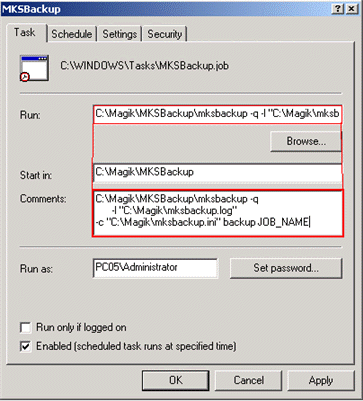 ... and open the Task Scheduler to fine tune it.
control.exe schedtasks
Windows Vista, 7, 2008 and R2
Since Vista, SCHTASKS command has changed a little :
SCHTASKS /Create /RL HIGHEST /SC DAILY /TN MKSBackup /ST 22:45:00 /RU Administrator /RP "" /TR "\"C:\Magik\MKSBackup\mksbackup.exe\" -q -l \"C:\Magik\mksbackup.log\" -c \"C:\Magik\mksbackup.ini\" backup BACKUP_JOB"
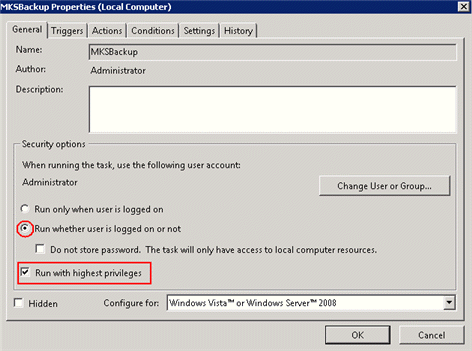 ... and open the Task Scheduler...
control.exe schedtasks
Be sure Run with highest Privilege is enable and the task will run even if no user are logged on.
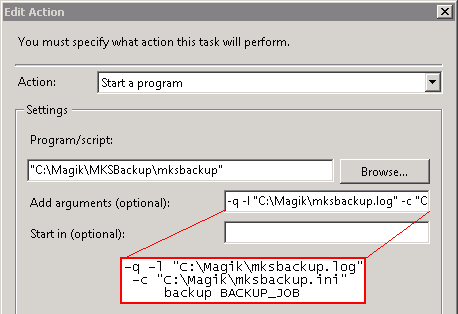 Be careful, here the command line is in 2 parts: the program and arguments !
